 RCRAReady
Compliance 15 min read
Hazardous Waste Tracking: Why Generators Outgrow Spreadsheets (2026)
Gaps in waste records draw RCRA fines and repeat citations. How hazardous waste tracking works, why it drifts as programs grow, and how to keep it current.
On this page
An undated drum in a central accumulation area, a missing manifest, or a late exception report is a RCRA violation. The maximum penalty is $124,426 per day, per violation under §3008(a)(3), as of January 8, 2025. That month, Stericycle agreed to a $9.5 million penalty for violations that included inaccurate manifest records and late e-Manifest filings.
Citations also repeat. In RCRAReady’s analysis of EPA data, facilities with a prior violation were 89% more likely to be cited again on their next inspection (61.1% versus 32.3%).
Hazardous waste tracking is the running record of a site’s waste containers: what is in each one, where it is, when its accumulation clock started, how much it holds, and where it went. Generator status, deadlines, inspections, manifest follow-up, and the biennial report are all calculated from it. Tracking is the generator’s part of RCRA’s cradle-to-grave system, which follows hazardous waste from generation to final disposal.
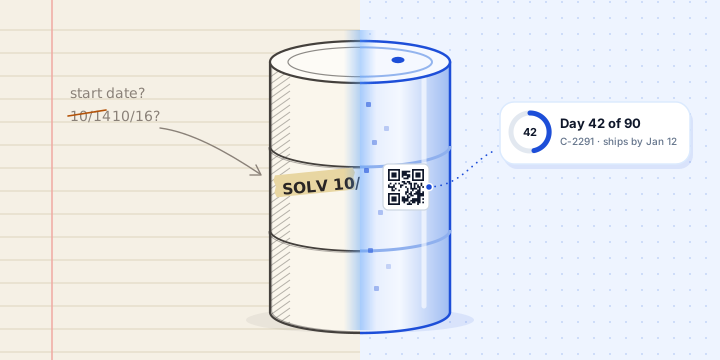
A record is only as current as its last entry: a drum started Monday and typed up from notes on Friday is missing from every deadline and monthly total for four days. So the first job of any tracking system is getting the person holding the drum to log it on the spot. This guide covers what that takes, and what it pays back as a program grows.
Key points
- One unlogged drum can change a month’s generator category.
- Records drift as people, areas, waste programs, and sites are added.
- Heavy EHS software fails on the floor when logging is slow, and the records fail with it.
- Tracking software earns its place when an entry takes a few taps on a phone, and the dates, alerts, and audit history follow from it.
- AI speeds up entry and drafts classifications. The record, the dates, and the sign-off stay with people and fixed rules.
What Does Hazardous Waste Tracking Cover?
Six federal requirements depend on a container-level record:
| Requirement | What the record has to show | Rule |
|---|---|---|
| Generator category | Each calendar month’s total of non-acute waste, acute waste, and acute spill residue | 262.13 |
| Accumulation limits | Each container’s start date: 90 days at an LQG, 180 at an SQG, or 270 if the SQG’s waste travels 200 miles or more | 262.16, 262.17 |
| Satellite areas | Volume in each SAA, and the date any excess over 55 gallons began | 262.15 |
| Weekly inspections | Each central accumulation area checked at least weekly | 262.16(b)(2)(iv), 262.17(a)(1)(v) |
| Manifests | Signed copies kept three years, and follow-up when a return copy is late | 262.40, 262.42 |
| Biennial report | LQGs report waste generated and shipped in each odd-numbered year | 262.41 |
Every row comes from a few kinds of entries: a container started, waste added, a move to the CAA, an inspection, a pickup.
On the floor
One record
What it decides
- Container started
- Waste added
- Moved to the CAA
- Picked up
- Waste
- Spent solvent · D001, F003
- Area
- CAA North
- Start date
- Oct 14
- Quantity
- 39.6 G
- History
- 6 entries
- Generator status
- Accumulation deadlines
- Text and email alerts
- Inspection walk
- Manifest follow-up
- Waste reports
How Does One Missing Entry Affect Compliance?
Because every output is calculated from the same entries, a gap in the record spreads. Generator category is set by each calendar month’s total, so a single drum can move a site from SQG to LQG for that month, and LQG rules then apply to that month’s waste.
March: one drum never logged
One 55-gallon drum, about 180 kg, filled but not logged
Wrong category
The record shows an SQG month. The site was an LQG, with LQG rules, including the 90-day limit.
No clock
The drum has no start date in the record, so nothing counts down to its deadline or sends an alert.
Short reports
March comes in 180 kg low. An LQG month in an odd-numbered year also brings a biennial report.
Missed entries are ordinary. A drum gets started on a night shift, filled from several processes, or moved by someone who doesn’t own the log. Storage-time limits and container dating are among the most common RCRA violations, and both depend on knowing when each container started.
Why Does Tracking Break Down as Programs Grow?
A site with a few drums, one accumulation area, and one person who owns the log can keep an accurate record on paper or in a shared spreadsheet. Growth adds places where the record and the floor can disagree:
- More people. Operators, lab staff, and shift leads all add waste. Each is a chance for an entry to be late, skipped, or made twice.
- More areas. Satellite areas in several buildings, each sending waste to the CAA on its own schedule.
- More programs. Hazardous waste, universal waste, used oil, and batteries follow different rules and count differently toward generator status.
- More pickups. Each shipment starts its own manifest follow-up clock.
- More sites. Each facility has its own category, state rules, and dates, and someone has to see all of them.
The pattern shows up in EPA’s records. RCRAReady’s analysis of RCRAInfo and e-Manifest data ranked sites by operational complexity: manifest volume, waste-code breadth, and the number of transporters and receiving facilities. The most complex tenth had a 27% higher violation rate at their next compliance evaluation than the least complex tenth (30.2% versus 23.7%). The study measures correlation, and the direction matches what complexity does to a record: more moving parts, more room to drift.
The usual tools fail in predictable ways at that scale:
| Method | Where it breaks |
|---|---|
| Paper log | Easy to fill in beside the drum, but invisible from the office, and nothing warns anyone before a date |
| Shared spreadsheet | Visible from the office, but someone types each entry later, from notes. Edits replace earlier values, and version history is hard to show an inspector |
| Whiteboard | Current today and wiped tomorrow, with no history to show an inspector |
| Large EHS suite | Built for the office: desktop forms that floor staff avoid, so entries pile up for one person to key in |
The common failure is time: the gap between when something happens to a container and when the record says so.
Typed in later From notes, a whiteboard, or tape on the drum
The record is out of date for four days, and the CAA start date comes from memory.
Logged at the drum Scanned as each thing happens
Each entry carries the time it happened, so the clock starts on the right day.
- Started
- Waste added
- Moved to CAA
- Entry made as it happened
- Entry typed in later
- Not in the record yet
Why Is Field Adoption the Hard Part?
Tracking fails at the drum. The person holding it skips the entry, or makes it a day later. EHS platforms built for the office fail right here: they assume a desk, a login, and training, and they ask floor staff for fields they don’t know. People work around them, the record goes stale, and the alerts, reports, deadlines, and generator status built on it go stale with it.
A tool people will use on the floor has to:
- Run on the phone they already carry. No app store and no device rollout. A browser and a camera are enough.
- Open the record with one scan. The label on the container is the way in.
- Ask only what the person knows. What went in, how much, and when. The waste profile supplies the codes, and the rules supply the dates.
- Take seconds. The fewer steps between the drum and a saved entry, the more entries get made at the drum.
- Cope with a weak signal. Storage areas sit in basements, steel buildings, and the far corners of a site.
Logging Waste in RCRAReady
RCRAReady is hazardous waste tracking software for U.S. generators, built so the person at the drum can log waste in seconds from their own phone.
1 Scan the label
The phone's camera reads the container's QR code, right in the browser.
2 Choose the action
The container opens with its waste, area, and fill level. Add waste, move it, or ship it.
3 Confirm and save
The waste and today's date are already filled in. Set the new fill level and save.
- RCRAReady is a mobile web app, so it runs in the phone’s browser with nothing to install. The scanner reads QR codes and common barcodes with the camera.
- Each container gets a printed QR label that links to its record, so the phone’s own camera app opens it too. The label goes beside the required hazardous waste marking, which still has to be on the container.
- Adding waste from a scan takes about five taps and the amount. The container is already chosen, and its current waste and today’s date are filled in.
- Weekly inspections keep working with no signal and upload when the connection returns. Other changes need a connection.
Can AI Track Hazardous Waste?
Not by itself. An AI model can’t see what went into a drum, when it started filling, or when it moved to the CAA. Someone at the drum still has to record that, so the capture step decides the quality of the record, whatever software sits on top of it.
Plenty of products now add a chatbot or run data through an AI model and call themselves AI-native. Some teams are even “vibe coding” their own tools. As a compliance record, these typically fall short in four ways:
- Limited floor visibility. A model works only with the data it’s given. Even well-equipped facilities with smart scales, PLC integrations, and RFID gates capture only slices of the picture, and those devices need predictable processes. The floor is messier: a spill gets cleaned up, a stray can goes into the wrong drum, and only the person there knows what happened and why.
- A chatbot transcript is not a compliance record. An inspector asks for a dated, append-only history of each container, and a conversation with a model contains none of it.
- AI answers drift. Ask a language model the same question twice and the answer can change, and it changes again when the model is updated. A 90-day deadline needs the same date every time, with the rule behind it.
- Nobody signs off. The generator is responsible for each hazardous waste determination (262.11), and an answer no person reviewed can’t carry that responsibility.
Homegrown tools carry one more risk: someone has to keep the rules current. EPA’s 2024 e-Manifest rule moved the LQG manifest contact deadline from 35 to 45 days, effective January 22, 2025, so any tracker built on the old date had to be updated by someone who knew it had changed.
AI is still a promising technology, and our testing shows real benefits in narrower jobs:
- Faster, more consistent entry. Suggesting the right profile as an operator types, or filling fields from what the record already knows, saves taps and keeps names consistent.
- Draft classifications. Models trained on vast amounts of text can propose likely codes and a program for a person to check, working from a description, documents such as an MDS or SDS, and available process knowledge. That last input matters: an SDS describes the product as sold, not the waste after use.
- Spotting entries that look wrong. A model can scan a record for quantities, codes, or dates that don’t fit the pattern and hand them to a person to confirm.
How RCRAReady Uses AI
- What you have
A description, a document, or a typed name
- An SDS, lab report, or vendor profile
- A waste name typed in Add Waste
- AI drafts
Likely codes, program, or matching profile
- Each answer carries a confidence level
- Each suggested value shows Why?
- A person decides
Review, then approve or correct
- An admin approves each profile
- An operator confirms each suggestion
- Rules take over
Deadlines, generator status, and alerts
- Calculated from federal and state rules
- Each date shows the rule behind it
- In Add Waste, RCRAReady suggests the matching profile (“Looks like…”) as an operator types a name, and only when it’s confident. For a waste with no profile yet, it estimates the program, and the pending profile reads “Until reviewed: treated as…” until someone checks it.
- In waste profiles, AI reads a description, SDS, lab report, or vendor document and answers set questions about the waste, each with a confidence level. Fixed rules turn those answers into codes, each suggested value shows Why?, and an admin approves the profile. Starter profiles suggested from the facility’s EPA manifest history arrive the same way, pending review.
- Every change is measured. The classifier is scored against hundreds of real waste descriptions from Texas generator registrations, EPA’s Biennial Report, and e-Manifest, including held-out test cases and fresh samples it has never seen. The profile suggestions and pending estimates have evals of their own.
What Does an Accurate Record Give You?
Once entries are made at the drum, the rest of the program runs from the record.
Deadlines and Alerts, Straight From the Rules
RCRAReady calculates each container’s accumulation deadline from its start date, the facility’s generator category for the month, and the federal and state rules, and shows the citation behind each date. The same entries always give the same dates. Text and email alerts go out before each one, to the people each facility chooses.
C-2291 · CAA North 90-day limit · ship by Jan 12
Alerts 30, 15, 5, and 0 days before the limit, then on Mondays while the container is overdue.
- SAA move Waste over the satellite area limit moves within 3 days 3, 1, and 0 days before
- Weekly inspection Each tracked CAA, every week The day before it's due, then overdue
- Manifest follow-up LQG contact by day 45, exception report by day 60 15, 5, and 0 days before
Generator Status, Every Month
Generator category can change month to month, so it has to be worked out from the waste logged in each one. RCRAReady recalculates it from logged waste and recorded spills whenever an entry changes, warns on the dashboard as a month nears the LQG threshold, and keeps a month-by-month history. Check a single month by hand with the Generator Status Classifier.
One Record the Whole Team Works From
Everyone with access works from the same record. A container the night shift moved shows in its new area when the EHS manager opens the dashboard in the morning. Roles set who can change what: admins, operators, and viewers, assigned per facility.
An Audit History Written as You Work
Every container, waste entry, move, inspection, shipment, and profile change is written to an append-only log with who did it and when. A correction is added as a new entry, so the original stays. The Audit Trail filters by area or person and exports as a PDF report or CSV.
- Container added C-2291 · 55 G drum · Bay 2 (satellite area)
- Waste added Spent solvent blend · 25.3 G · 46% full
- Waste added Spent solvent blend · 14.3 G · 72% full
- Waste entry changed 14.3 G corrected to 13.8 G. The original entry stays in the log.
- Container moved Bay 2 to CAA North · 90-day clock starts, ship by Jan 12
- Inspection completed CAA North · weekly inspection · no findings
- Alert sent Container deadline in 30 days · text and email
- Container shipped Pickup with Example Recycling LLC · manifest tracked to its return
That is what an inspector asks about: when the drum started, who added what, when it moved, and when it left. Manifests and reports have to be kept for at least three years (262.40), and the log already holds that history when the inspector arrives.
Weekly Inspections That Start From the Inventory
An RCRAReady inspection covers one accumulation area and starts from the containers the record says should be there, so a missing or extra container stands out. Leaks, open containers, label and date problems, and blocked access are logged as findings, with photos. A leak, a damaged container, or an open lid needs one. Each finding becomes an issue that stays open until someone closes it out. The weekly inspection guide covers what to check.
Waste Profiles: Decide Once, Reuse Every Time
Every waste stream needs a hazardous waste determination, and SQGs and LQGs must keep the records behind it for at least three years after the waste was last shipped (262.11(f)). A waste profile holds that decision for a recurring stream: its program, its federal and state codes, how it was decided, and the paperwork behind it. On the floor, the operator picks the profile, and the codes, program, and rules come with it.
- Program
- Hazardous waste
- Codes
- Federal D001, F003, F005
- How it was decided
- SDS
- Generator total
- Counts
- On site
- 39.6 G in 1 container
Paperwork SDS Lab report
- Created Drafted from the uploaded SDS
- Edited F005 added after review
- Status update Approved by an admin
- Program
- Universal waste · Lamps
- How it was decided
- Process knowledge
- Generator total
- Excluded
- On site
- 3 containers
Paperwork Vendor profile
In RCRAReady, a profile can start three ways: suggested at setup from the facility’s EPA manifest history, drafted by AI from an uploaded SDS, lab report, or vendor document, or entered by hand. Drafts are saved for review until an admin approves them, and every change stays in the profile’s timeline and the audit trail.
Every Waste Program, With Its Own Rules
Most sites manage more than hazardous waste: spent lamps and batteries, used oil, aerosol cans, and state-regulated streams. Each program has its own clock and marking rules, and only hazardous waste counts toward the federal generator category (262.13(c)). A box of spent lamps managed as universal waste stays out of the monthly total. Logged as hazardous waste, it adds to it.
- Hazardous waste 40 CFR 262 90 days at an LQG, 180 at an SQG Counted
- Universal waste Part 273 1 year for batteries, lamps, aerosol cans, pesticides, and mercury equipment Not counted
- Used oil Part 279 No federal time limit. Containers marked “Used Oil” Not counted
- Lead-acid batteries Part 266, Subpart G No federal clock when sent for reclamation, or 1 year as universal waste Not counted
- State-only hazardous waste State waste codes The state's accumulation rules, where it applies them to the code Per state
- Other regulated TSCA, medical, radioactive, and other programs Set by the program that covers it Not counted
In RCRAReady, each profile’s program sets the clock, the alerts, and whether the waste counts. Lead-acid batteries can follow the reclamation route or the universal-waste route. A universal waste type your state hasn’t adopted is treated as hazardous waste. State-only waste is handled code by code: each state code carries its state’s rules, so it can follow the state’s accumulation limits and count toward the state’s category where the state says it does.
Shipments, Followed to the Signed Copy
Pickups are where spreadsheets lose the cradle-to-grave thread: the containers leave the log, and the manifest follow-up moves to someone’s inbox. In RCRAReady, a pickup is built from the containers you already track, and the follow-up stays on the same record.
- Pickup planned
Build the pickup
- Scan or pick the containers going out
- Gaps such as a missing waste code are flagged first
- Picked up
Record the pickup
- Containers close and come off the deadline list
- The follow-up clock starts from the pickup date
- Awaiting return
Wait for the signed copy
- LQG contact by day 45, exception report by day 60
- Alerts 15, 5, and 0 days before each date
- Returned
Match the final copy
- Synced from e-Manifest, or recorded by hand
- Kept with the shipment and its audit trail
No copy by day 60? Log the contact, the exception report, and any state copy on the shipment, then close it as Closed, no return copy. The audit trail keeps every step.
Recording the pickup closes those containers, so they come off the deadline list, and starts the follow-up from the pickup date. With your e-Manifest account connected, RCRAReady imports your manifests, matches them to shipments, and tracks each signed return copy. Your vendor still prepares the manifest and you still sign it, as the manifest guide explains. RCRAReady handles what comes after.
Trends and Reports From the Same Data
Every entry is dated, placed, and assigned a program, so reports come straight from the record. You can see waste generated by month and by facility, hazardous waste streams, generator status by month, shipments and receiving facilities, and pickups still waiting on signed copies. Across facilities, the same record shows which sites need attention now.
All facilities
Needs action now
- Riverside Plant Weekly inspection overdue in CAA 2
Coming up
- North Plant 3 containers reach their limit within 15 days
- Lab Annex Manifest contact due in 5 days
Needs data
- East Warehouse No waste logged this month
On track
- Westfield Nothing due in the next 30 days
Waste generated by month
Hazardous waste Universal waste, used oil, and other programs
Containers, waste profiles, shipments, and the audit trail export to CSV, with the waste and shipment records your biennial report draws on.
When Does a Site Need Tracking Software?
A spreadsheet works for a few containers, one area, and one owner. Software pays off when:
- Several people add waste or move containers.
- There is more than one accumulation area, or satellite areas in several buildings.
- The site is an LQG, or crosses into LQG in some months.
- Waste leaves on regular pickups, each with a manifest to follow.
- You manage more than one facility, or client sites as a consultant.
- The site has been cited before.
At that size, the cost is the hours spent reconciling the log, chasing dates, and rebuilding records before an inspection. For a quick read on where your records stand, the Audit Readiness Assessment takes ten questions.
Regulatory Sources & References
- Official Citation: 40 CFR § 262.11 - Hazardous waste determination and recordkeeping
- Official Citation: 40 CFR § 262.13 - Generator category determination
- Official Citation: 40 CFR § 262.15 - Satellite accumulation area regulations
- Official Citation: 40 CFR § 262.16 - Conditions for exemption for a small quantity generator
- Official Citation: 40 CFR § 262.17 - Conditions for exemption for a large quantity generator
- Official Citation: 40 CFR § 262.40 - Recordkeeping
- Official Citation: 40 CFR § 262.41 - Biennial report
- Official Citation: 40 CFR § 262.42 - Exception reporting
- Official Citation: 40 CFR § 266.80 - Spent lead-acid batteries being reclaimed
- Official Citation: 40 CFR § 273.15 - Universal waste accumulation time limits
- Official Citation: 40 CFR § 279.22 - Used oil storage
Frequently asked questions
What is hazardous waste tracking?
Hazardous waste tracking is keeping a running record of each container of waste a site generates: what is in it, where it is, when its accumulation clock started, how much it holds, and where it went. Generator status, accumulation deadlines, weekly inspections, manifest follow-up, and the biennial report are all worked out from that record.
What does cradle to grave mean for hazardous waste?
Cradle to grave is EPA's term for how RCRA controls hazardous waste at every stage: generation, transportation, treatment, storage, and disposal. Each party keeps its own part of the record. The generator tracks each container on site until pickup, and a manifest travels with each shipment to the receiving facility, which signs it and returns a copy. If that copy doesn't come back in time, the generator has to follow up under 40 CFR 262.42.
Is hazardous waste tracking required by law?
In practice, yes. The federal generator rules require facts that only a container-level record can supply: the monthly generator category (40 CFR 262.13), an accumulation start date on each central accumulation area container (262.16 and 262.17), weekly inspections of those areas, signed manifests kept for three years (262.40), and, for large quantity generators, the biennial report (262.41).
What are the penalties for poor hazardous waste records?
Record failures are cited like any other RCRA violation. As of January 8, 2025, civil penalties reach $124,426 per day, per violation under RCRA §3008(a)(3), or $93,058 under §3008(g) (40 CFR 19.4). Those are maximums: EPA scales actual penalties to the harm, the extent of the violation, and the facility's circumstances. Stericycle's $9.5 million settlement with DOJ and EPA in January 2025 covered violations that included inaccurate manifest records and late e-Manifest filings.
Can I track hazardous waste in a spreadsheet?
Yes, for a small, stable program: a few containers, one accumulation area, and one person who owns the log. Spreadsheets struggle once several people add waste, containers move between areas, or the site runs several waste programs. Entries get typed in later from notes, edits replace earlier values without a clear record of who changed them, and nothing reminds anyone before a deadline.
Why do EHS software rollouts fail on the floor?
Because the people who handle the waste stop using it. Desktop forms, long field lists, and training requirements make logging slow at the drum, so entries get batched, skipped, or left to one person. Generator status, deadlines, alerts, and reports are then calculated from an incomplete record.
What should hazardous waste tracking software do?
Log containers in seconds on a phone, with labels and scanning. Calculate accumulation deadlines and monthly generator status from federal and state rules. Alert the right people by text and email before dates pass. It should also guide weekly inspections, follow shipments until the signed manifest is back, keep an append-only audit trail, and export records for inspectors and reports.
Does universal waste or used oil count toward generator status?
No, when it is managed under its own rules. Under 40 CFR 262.13(c), the monthly count leaves out universal waste managed under part 273, used oil managed under part 279, and spent lead-acid batteries managed under part 266, subpart G, along with a few other exclusions such as waste from a properly managed episodic event. States can differ.
What is a waste profile in hazardous waste tracking?
A waste profile is the saved record of a recurring waste stream: its regulatory program, its federal and state waste codes, how the determination was made, and the documents behind it, such as an SDS or lab report. Containers are logged against the profile, so its codes and rules come with every entry. Disposal vendors also use the term for their own approval form, which is a separate document.
How long do generators have to keep hazardous waste records?
At least three years for the main federal records. Signed manifests are kept for three years from the date the initial transporter accepted the waste, biennial and exception reports for three years from their due date (40 CFR 262.40), and waste determination records for three years from when the waste was last sent for treatment, storage, or disposal (262.11(f)). Each period is extended automatically during an unresolved enforcement action.
Can AI track hazardous waste?
Not by itself. AI cannot see what went into a container or when it moved, so someone on the floor still has to record it. Scales, PLC integrations, and RFID gates capture pieces such as a weight or a doorway pass, but not what the waste is or which codes apply. An AI model is also no substitute for the record: its answers can change between runs and model versions, its conversations are not an append-only history, and nobody reviews its answers. AI is useful for narrower jobs: suggesting profiles and filling fields to speed up entry, drafting waste classifications from descriptions and safety data sheets for a person to approve, and flagging entries that look wrong for review.
Does RCRAReady use AI?
Yes, for drafts and suggestions that a person approves. RCRAReady suggests matching waste profiles as operators log waste, estimates how to treat a waste that has no profile yet until it is reviewed, and drafts waste profiles from descriptions, SDSs, lab reports, and vendor documents, with a confidence level and a Why? behind each suggested value. Deadlines, generator status, and alert timing come from fixed federal and state rules, and each classifier change is measured against real waste descriptions from public EPA and state records.
What is RCRAReady?
RCRAReady is hazardous waste tracking software for U.S. generators and the consultants who manage them. Operators scan container QR labels with a phone camera in the browser, with nothing to install. RCRAReady calculates accumulation deadlines and monthly generator status from federal and state rules, sends text and email alerts before each date, and runs weekly inspections that keep working offline. It also follows each shipment until the signed manifest returns and keeps an append-only audit trail.